Private AI for
law firms. Built for your practice.
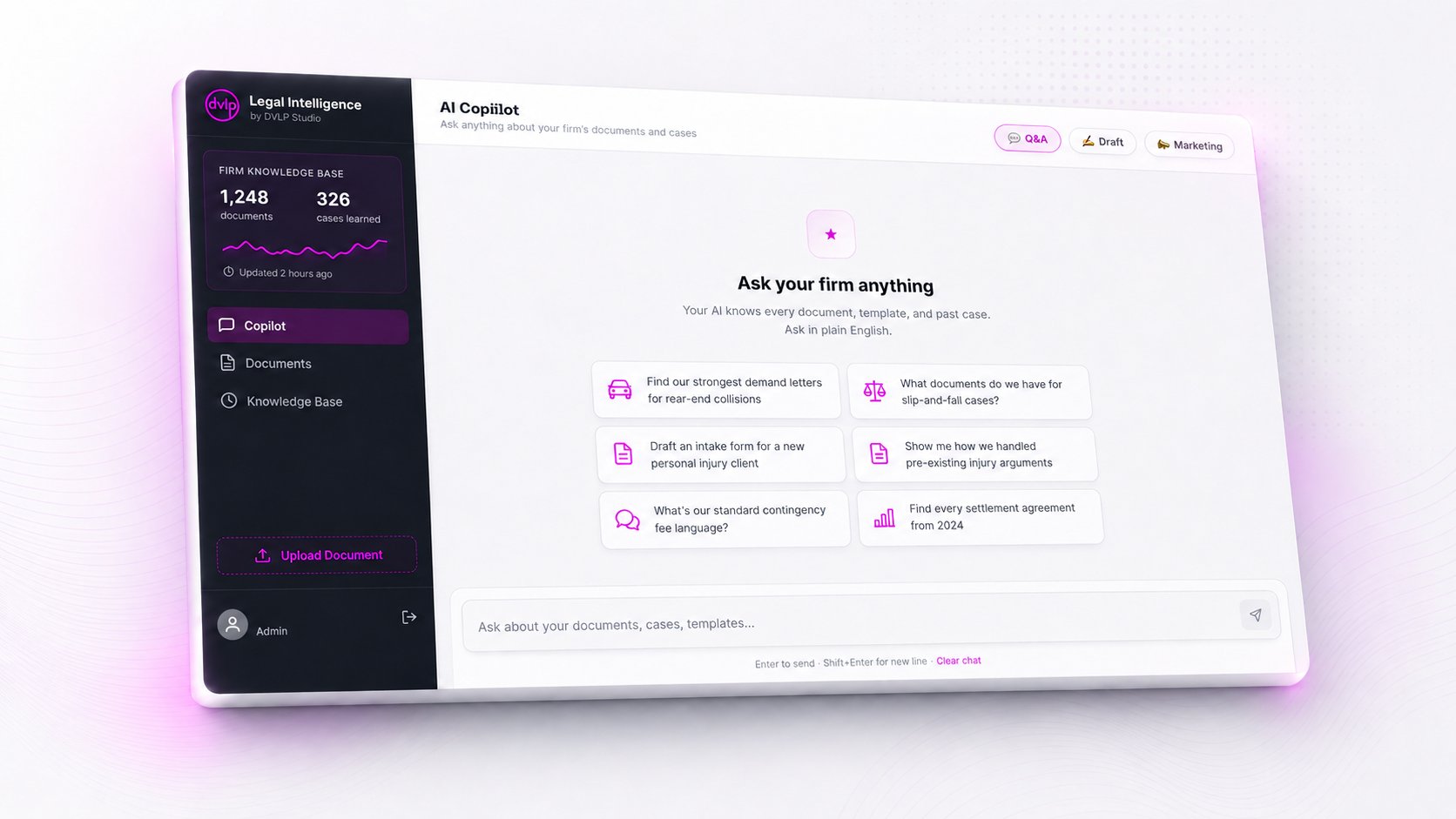
Legal Intelligence is a private AI copilot trained on your firm's own documents — your case files, your templates, your jurisdiction-specific patterns. Find any document in seconds. Draft from your own templates. Every answer cites its source. Your data never leaves your instance.
Generic legal AI doesn't know the difference between a workers' comp claim and a personal injury demand. Legal Intelligence is configured for your specific practice area, your document types, your court forms, and your jurisdiction.
AI for Personal Injury Law Firms
Built for high-volume PI practices. From auto and rear-end collisions to slip-and-fall, medical malpractice, and wrongful death cases.
Demand letter generation from past wins
Medical record summarization & chronology
Settlement value analysis from case history
Deposition prep with cited case files
Insurance correspondence drafting
AI for Immigration Law Firms
Configured for asylum, family-based, employment, and removal practice. Knows USCIS forms, EOIR processes, and country conditions research.
I-589, I-130, I-485 form preparation
Country conditions evidence library
Asylum declaration drafting from intake
Brief generation with cited precedent
Client communication translation drafts
AI for Social Security Disability Firms
Built for Social Security disability practice, including SSI and SSDI cases. Knows POMS sections, listings, the Blue Book, and ALJ hearing procedures.
POMS-cited RFC analysis & reasoning
Pre-hearing brief drafting from templates
Medical evidence summarization
Onset date strategy memos
Vocational expert prep questions
A real day
Six things your team did manually yesterday.
Legal Intelligence handles the high-volume, repetitive document work that paralegals and associates spend hours on every week. Here's what it looks like in practice.
8:42 AM
Find that demand letter from a case 18 months ago
"Find our strongest demand letters for rear-end collisions over $150,000." Returns 14 matches with citations to specific case files in under 3 seconds.
10:15 AM
Draft a pre-hearing brief from your template
"Draft a pre-hearing brief for a claimant with lumbar DDD and MDD, sedentary RFC, using our Hawaii template." Drafts in your firm's voice with POMS citations.
11:30 AM
Summarize 400 pages of medical records
Drop a PDF in, get a chronology of treatment, key diagnoses with dates, treating providers, and contradictions flagged for review. Cited to specific page numbers.
1:45 PM
Check what your firm did last time
"How did we handle the pre-existing injury argument in the Rodriguez case?" Returns the brief section, the deposition prep, and the result. Institutional memory, instantly accessible.
3:20 PM
Draft client communication
"Draft an update to the Tua family about their case status." Pulls latest case activity, drafts in your firm's tone, ready for attorney review in 30 seconds.
5:08 PM
Bulk-tag closed cases for future retrieval
Three cases settled this month. Select all three, tag them "Closed Won · 2026 Q2 · Lumbar," and the AI now treats them as institutional knowledge for every future case that pattern-matches.
Your first month
From signup to institutional memory in four weeks.
DVLPstudio Legal Intelligence gets more valuable the more your firm uses it. Here’s what the ramp typically looks like.
WEEK 1 · SETUP
Upload your starter library and create your first matters.
We set up your firm’s private instance and walk you through uploading your strongest templates, recent case files, and reference documents. Most firms start with 20–50 files and 5–10 active matters. You don’t need to migrate years of history. Start with what you’re actively working on.
WEEK 2 · FIRST WINS
Attorneys start using it on live cases.
Drop in 400 pages of medical records, get a chronology cited to specific pages. Pin a matter to chat, ask for a pre-hearing brief draft from your firm’s template. Pull prior arguments from closed cases. This is where the time savings become visible. Most attorneys save 5–10 hours in week 2 alone.
WEEK 3 · STAFF WORKFLOW
Paralegals and associates make it part of their day.
The paralegal stops scrolling through records manually. Status letters get drafted in three minutes instead of twenty. Hearing prep memos pull from prior cases automatically. By the end of week three, your team is asking “how did we work without this?”
WEEK 4 · COMPOUNDING
Institutional memory starts paying you back.
100+ documents in the system. Active matters tagged for retrieval. The AI surfaces past arguments, prior briefs, and analogous fact patterns instantly. Onboarding a new associate becomes easier. Cross-case pattern questions get real answers. The product gets noticeably better every week from here.
Capabilities
Every feature, built around actual legal work.
Knowledge Copilot
Ask anything. Get cited answers from your firm's documents.
Your firm's entire knowledge base, including case files, templates, depositions, briefs, and correspondence, all searchable in plain English. Every answer cites the specific document it came from, so attorneys can verify before relying.
Type a question, get an answer with the source document attached. The "I know we have a template for this somewhere" problem ends here.
Plain English queries. No boolean operators, no precise field matching.
Cited to source. Every answer links back to the document, page, and paragraph.
Cross-case search — "How did we handle this kind of case last time?" gets a real answer
Sub-3-second responses. Paralegals stay in flow.
Drafting Copilot
Draft from your firm's templates, not generic AI.
Legal Intelligence learns your firm's templates, clause library, and writing style. When you ask it to draft a demand letter, you get a demand letter that reads like your firm wrote it. Because your firm did, repeatedly, over years of cases.
No more starting from a blank page or rewriting a generic template until it sounds like you. Your firm's voice is already in the model. Ask for a draft, get one that reads like your work.
Demand letters written in your firm's tone, with your clauses and damages framework.
Pre-hearing briefs built from your firm's template plus the current case file.
Client correspondence drafted in your firm's voice and ready for attorney review.
Discovery responses drawing on your firm's prior objections library.
Matter-Aware AI
The AI knows which case you’re working on — and uses that context in every answer.
Generic AI treats every question like a blank slate. Legal Intelligence lets you pin a matter to your conversation, then injects the case facts, the client, the practice area, and your assigned documents into every prompt. The AI starts the conversation already knowing your case.
Tell the AI which case you're on once. It remembers the client, the facts, and the files for every question after that.
Pin a matter to chat. The AI knows your client, practice area, and case facts.
AI auto-suggests pinning when you mention a client by name in your first message
Retrieval boost — documents tied to the case jump to the top of search results
Smart upload routing — drag in a document mid-chat, it auto-files to the current case
How it compares
Built different from the AI tools you’ve tried.
Capability
ChatGPT
Generic legal AI
DVLPstudio Legal Intelligence
Trained on your firm’s documents
No
No
Yes
Knows which case you’re working on
No
Limited
Yes
Practice-specific (POMS, HALLEX, ABA)
No
Surface-level
Yes
Private instance / no data training
No
Varies
Yes
Output cited to source documents
No
Sometimes
Yes
ABA Opinion 512 compliance documentation
No
Varies
Yes
Compliance & security
Built for the ethics rules your firm has to follow.
Legal Intelligence is designed around ABA Model Rule 1.6 (confidentiality), ABA Formal Opinion 512 on generative AI (July 2024), and the state-specific guidance that's followed.
Per-firm isolation
Each firm gets its own dedicated database. Your documents never share infrastructure with other firms — no privilege contamination risk.
No model training
Your data is never used to train any model — ours or any third party. Written into the DPA. Verified in audit logs.
ABA Opinion 512 compliant
Built around ABA Formal Opinion 512. Includes engagement letter language for AI disclosure and a sworn declaration template for outside counsel guidelines.
Full audit trail
Every query, every document accessed, every draft generated — logged with timestamps and user IDs. Ready for any client or bar audit.
Integrations
Connects to your existing stack.
Legal Intelligence reads from where your firm already keeps its documents — no migration required, no parallel system to maintain.
We're not publishing public pricing during beta. We're keeping the first cohort small and pricing the value, not a feature list. Beta firms get founding-partner pricing locked in for life.
30-minute call. Direct pricing.
We'll show you the product, talk pricing, and be honest about fit. No deck. No follow-up sequence.
Six questions law firm partners ask before getting on a call.
Legal Intelligence is a private AI copilot designed for law firms. It trains on your firm's own documents, templates, and case history, letting attorneys and paralegals find documents, draft from templates, and answer questions in seconds — without sharing data with any third party or generic AI service.
ChatGPT knows the internet. Legal Intelligence knows your firm. Your demand letter templates, your case history, your jurisdiction-specific patterns, your standard operating procedures. Every answer cites the specific document it came from. Your data never trains any external model. And you never copy-paste client information into a chat window owned by someone else.
Yes. Legal Intelligence is built around ABA Model Rule 1.6 (confidentiality) and ABA Formal Opinion 512 on generative AI (July 2024). Your firm's data is isolated in a dedicated instance, is never used to train any model, and is never accessible to other firms. We provide a standard DPA, sworn declaration template, and engagement letter language for AI disclosure in client matters.
Legal Intelligence is currently deployed in private beta for personal injury, immigration, and Social Security disability law firms. Each deployment is configured for the specific document types, templates, court forms, and workflows of that practice area. We are not a general-purpose legal AI — we go deep on the verticals we serve. If your firm is in a different practice area and would benefit from a vertical-specific build, get in touch.
Priority onboarding takes about one week. You upload your document library to your firm's private instance, we configure your firm's templates and tone profile, and we set up your users and matters. Native integrations with Google Drive, OneDrive, Dropbox, Clio, and MyCase are on the 2026 roadmap. Direct upload works today and is the path beta firms use.
We don't publish public pricing during beta. We're keeping the first cohort small and pricing the value, not a feature list. Beta access is available at a founding-partner rate locked in for life. The best next step is a 30-minute call where we'll be direct about fit and cost for your specific firm.
Get started
Ready to see Legal Intelligence working on your firm's documents?
30-minute call. We'll load a few sample documents from your practice area and show you the product live. No deck. No follow-up sequence.